Saturday, December 31, 2011

Wildflowers 3 Column Blogger XML Template

Free Blogger / Blogspot XML skin / template! Click on the image to open a new window for a larger view. This theme is fixed width for 1024 wide and wider screens. This template will NOT work in "classic" Blogger mode.

This theme features 3 columns, an easy to edit and improved horizontal navigation bar under the header image, a built in RSS Subscribe Feed button and full support for drag and drop sidebar widgets in both the left and right sidebars.


Click Image For Larger View!!

Click Wildflowers Blogger XML Template to download the code. Only 12KB.

The images are already hosted via Photobucket, no need to download those separately!

IMPORTANT!

Make sure you backup or save your existing customizations like links and sidebar addons, hit counters, widget contents, etc. before deleting the old skin because they will be replaced by the new code. After installation just copy and paste your customizations back in from your original code. 

Backing Up And Installing
Backing Up Your Old Template Data
Installing Your New XML Template

In some cases the template editor will ask to confirm the deletion of some of the widgets / page element sections. This will happen when you have widgets installed that are not included in this theme. This theme includes a bare minimum of widget elements. You should make backup copies of the contents of those widgets before deleting or you will lose the data! Once the theme is installed, you can reinstall your widget elements and complete the customization.

Your blogs title will automatically replace the title you see in the header. The description or tagline will display in the header panel, edit it in your blogs "Settings" area.

Thursday, December 29, 2011

Google Testing New Email Subscription Ad Format


Google is experimenting with its Google Adwords offerings, attempting to go beyond regular text ads with Google Email Subscription Ads, allowing companies to buy ads that automatically fill in a “Subscribe to newsletter (or whatever, I’m assuming)” slot with a given searcher’s Google email address during a search.
Emailblog pointed out earlier this month that the ads were running with automaker Honda (ads which I still can’t see), and it seems like those offerings have expanded to results for email marketing services AWeber and Constant Contact (ads which I can see). Clicking on the “Privacy” button next to the subscription button lets you know that your email will be sent to the advertiser — In case that wasn’t clear(?).
When asked to explain what exactly was going on, a Google representative gave me the following statement (which is basically a more official sounding version I just said):
“We’re currently running a small experiment of a new ad format that helps users sign up more easily for email subscriptions or other free newsletters. This new ad format contains a box within the ad that displays a user’s Google email address (if logged in). If a user chooses to click ‘Subscribe to newsletter’ then the email address is sent to the advertiser directly, which is clearly disclosed within the ad itself.”
Something tells me TONS of email marketing companies will be using this once it’s actually official. My requests about whether or not (and when, if so) this will become a permanent feature have as of yet gone unanswered by Google.
From Techcrunch

Simplex Newsportal

It's a good template for magazine and newsportal  from Simplex. Make it easier to install and use.
There are two file for this template, one with Disqus comment system and the other not. I added images folder to template package, so if you want, you can host images yourself

Here are steps for installing this template

1,Download template file .

2,If you want to use Disqus comment system
Open this template in a word editor and change the text in bold in this code
 <script type='text/javascript'>
    /* * * CONFIGURATION VARIABLES: EDIT BEFORE PASTING INTO YOUR WEBPAGE * * */
    var disqus_shortname = &#39;simplexcelebs&#39;; // required: replace example with your forum shortname

    // The following are highly recommended additional parameters. Remove the slashes in front to use.
    // var disqus_identifier = &#39;unique_dynamic_id_1234&#39;;
    // var disqus_url = &#39;http://example.com/permalink-to-page.html&#39;;

    /* * * DON&#39;T EDIT BELOW THIS LINE * * */
    (function() {
        var dsq = document.createElement(&#39;script&#39;); dsq.type = &#39;text/javascript&#39;; dsq.async = true;
        dsq.src = &#39;http://&#39; + disqus_shortname + &#39;.disqus.com/embed.js&#39;;
        (document.getElementsByTagName(&#39;head&#39;)[0] || document.getElementsByTagName(&#39;body&#39;)[0]).appendChild(dsq);
    })();
</script>

and this code

<div class='dsq-widget' id='recentcomments'>&lt;script type=&quot;text/javascript&quot; src=&quot;http://simplexenews.disqus.com/recent_comments_widget.js?num_items=5&amp;hide_avatars=0&amp;avatar_size=32&amp;excerpt_length=200&quot;&gt;&lt;/script&gt;</div>
to your Disqus shortname .This step is required . If you choose template file without Disqus ,you can skip this step .

3,Upload template to Blogger

4,To add logo


click on edit link in logo widget

add logo into widget content like this

5,To add  link to your social network

click on Subscribe widget

add link to your social network accounts.

6,To add items to menu

click on edit link in menu widget

add link to your categories

Link to category in blogspot has structure http://yourblog.blogspot.com/search/label/category name

7,To show content in headline widget

click on edit link in headline widget

add the name of category you want to show in this widget

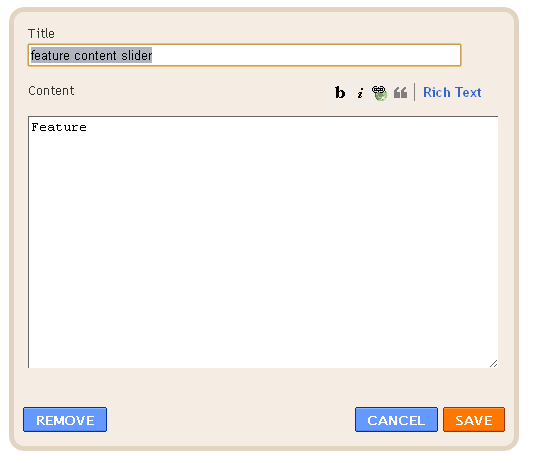
8,To show content in feature content slider

click on edit link in feature content slider

add name of category you want to show in slider into widget content

9,Do the same for content left ,content right widgets .Just add a category name into widget content ,and recent posts in this category will be shown in widget's position in homepage .

10,Top ads,ads1 ,ads2 are widgets for advertisment . To add your ads

click on edit link

add your ad code into widget content .

11,You can add your own widgets if you want

12, To add a forum ,create a page (Go to Dashboard-Posting tab ->Edit Pages,click on new page) , name it "forum" and then paste the forum embeded code into page content (in Edit HTML mode)


After that , go to Dashboard -> Go to Design -> Edit HTML ,search for the text 'http://simplexnewsportal1.blogspot.com/p/forum.html'

and replace it with link to 'forum' page you've just created .There are 3 places need to change in total .
1st place
1st
2nd
2nd
3rd
3rd
After that ,save the changes .

13,To increase/decrease the number of post in each category ,go to Design ->edit HTML -> checked Expand widget templates ,and find these variables in template file :
numposts = 3; 
numposts1 = 4; 
numposts2 = 6;

try to change these values to what you need .
That's all for this template . I hope you like this.